" height="26.80529977783203px" id="tymKb8bqC" width="128.00300311279295px"/><path d="M 0 2.417 L 0 0 L 12.909 0 L 12.909 2.417 Z" fill="rgb(126, 78, 253)" height="2.417099999999998px" id="aYr4em6zK" transform="translate(128.341 22.325)" width="12.908999999999992px"/></svg>)

"/><stop offset="1" stop-color="rgb(118, 37, 250)"/></linearGradient></defs><g d="M 19.242 21.22 L 19.362 6.204 L 19.272 6.204 L 13.757 21.22 L 10.161 21.22 L 4.796 6.204 L 4.706 6.204 L 4.825 21.22 L 0 21.22 L 0 0 L 7.283 0 L 12.109 13.607 L 12.229 13.607 L 16.844 0 L 24.247 0 L 24.247 21.22 Z M 26.421 26.113 L 26.421 23.445 L 41.407 23.445 L 41.407 26.113 Z" fill="transparent" height="26.112508199679183px" id="DvfaAIHYn" width="41.40731898311435px"><path d="M 19.242 21.22 L 19.362 6.204 L 19.272 6.204 L 13.757 21.22 L 10.161 21.22 L 4.796 6.204 L 4.706 6.204 L 4.825 21.22 L 0 21.22 L 0 0 L 7.283 0 L 12.109 13.607 L 12.229 13.607 L 16.844 0 L 24.247 0 L 24.247 21.22 Z" fill="rgb(46, 46, 46)" height="21.220180016149442px" id="pLsxRCobd" width="24.247352589074694px"/><path d="M 0 2.668 L 0 0 L 14.986 0 L 14.986 2.668 Z" fill="url(%23yD9d4I5GR-3279285344-linear-gradient)" height="2.6675085048549647px" id="yD9d4I5GR" transform="translate(26.421 23.445)" width="14.986002836263765px"/></g></svg>)

Camelia Khadraoui
Creating LinkedIn content now means thinking about both what you write and how your post looks in the feed.
For marketers, founders, and SaaS teams, previewing a LinkedIn post before publishing has become essential.
This is why AI-powered LinkedIn post mockups have become a key part of today’s marketing workflows.AI-driven LinkedIn post mockups let users make realistic previews of their content without having to publish anything.
Teams use these mockups for demos, landing pages, ads, and client presentations. This helps them visualize, test, and improve content before sharing it publicly.
In Short:
AI-powered LinkedIn post mockups let you see what your posts will look like before you publish them.
These tools help marketers and teams:
Check formatting,
Work together more easily,
Build a stronger brand,
Create better marketing materials like landing pages and demos.
Tools like BrandBird and MediaModifier make it easy to create realistic LinkedIn-style previews.
What's a LinkedIn Post Mockup?
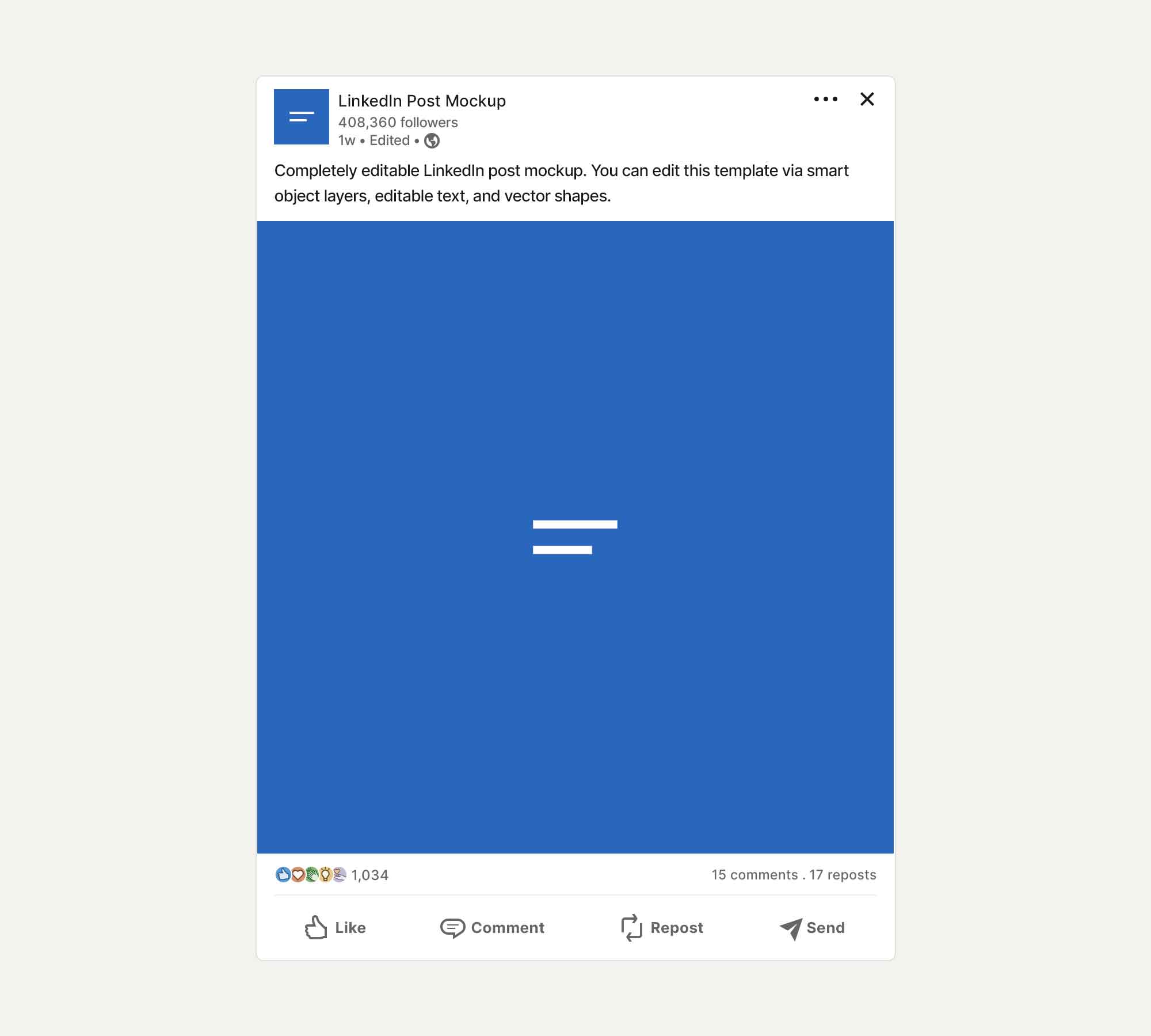
A LinkedIn post mockup is a visual preview that looks almost exactly like a real LinkedIn post.
It includes details like the profile photo, name, formatting, spacing, and engagement icons, so the post looks just like it would in the LinkedIn feed.
These mockups are designed to match LinkedIn’s unique style and professional look, unlike general social media mockups. People often use them to:
Preview posts before publishing
Showcase examples on landing pages
Create marketing visuals for AI tools
Present content ideas to clients or teams
Benefits of Using LinkedIn Post Mockups in Marketing
LinkedIn post mockups give marketing teams and creators useful ways to improve their work and strategy.
1. Better visual storytelling
With LinkedIn post mockups, you can see exactly how your post will look in the LinkedIn feed.
Rather than just explaining an idea, you can show it visually, making your message clearer and stronger.
This helps with storytelling because layout, spacing, and formatting all affect how people see your content on LinkedIn.
2. Faster content validation
Mockups let you test your ideas before you publish them.
You can quickly check whether a post looks engaging, is easy to read, and aligns with your goals.
This takes the guesswork out and helps you avoid posting content that doesn’t perform well because of poor formatting or structure.
3. Improved collaboration across teams
When everyone looks at the same mockup, feedback is clearer and easier to act on.
Marketing teams, clients, and stakeholders can get on the same page faster by viewing a real preview, not just a draft.
This reduces back-and-forth and speeds up approvals.
4. Stronger and more professional branding
Mockups help keep your formatting, tone, and look consistent across all your LinkedIn posts.
Being consistent builds your brand’s credibility and makes your LinkedIn presence look more professional.
Over time, this helps brands and creators stand out and become easier to recognize in the LinkedIn feed.
For AI platforms, LinkedIn post mockups are a strong product feature too. They let users instantly see what their content will look like, making the tool’s value clear from the start.
By showing real results rather than just ideas, mockups help users feel more confident, satisfied, and more likely to convert.
Top 2 LinkedIn Post Mockup Platforms
These two LinkedIn post mockup examples highlight how visual previews help turn simple ideas into polished, ready-to-publish content.
1. BrandBird
BrandBird is a user-friendly tool that helps you quickly create polished LinkedIn posts.
With BrandBird, you can create fully styled post visuals that meet professional branding standards, and you don’t need any design skills.
This tool is especially helpful for social media managers, content creators, and marketers who want LinkedIn post visuals that catch people’s attention.
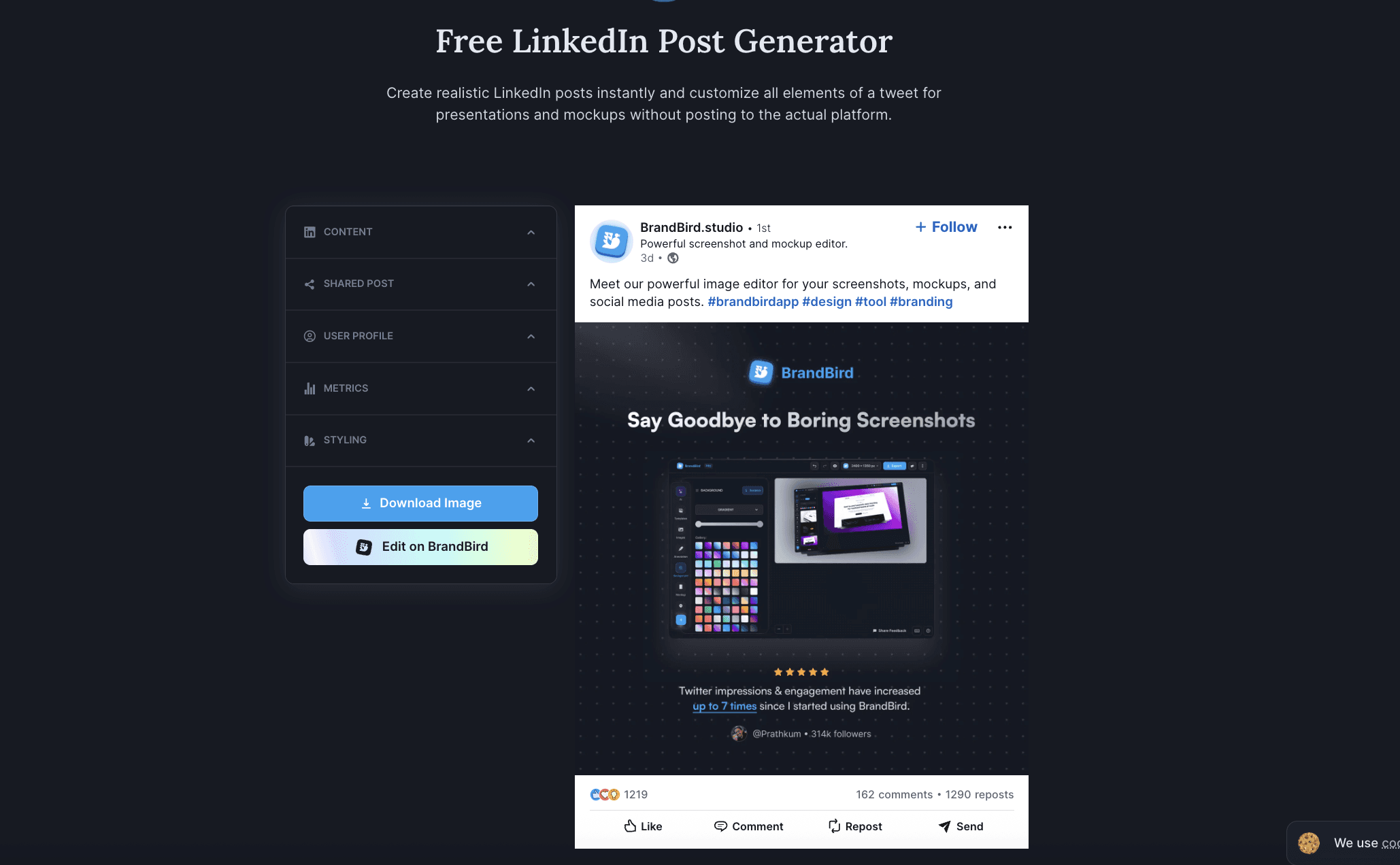
How to use BrandBird’s LinkedIn Post Generator
Start by navigating to BrandBird’s LinkedIn Post Generator page.
You’ll see a simple interface where you can start customizing your post right away.
First, choose a template or layout that matches your content style.
BrandBird has several pre-designed options, including simple text layouts and more visual, image-based designs.
Next, move to the text editor.
Type or paste your LinkedIn post copy into the designated field.
BrandBird automatically fits your text into the design, but you can change the font size, weight, and alignment if you want more control.
If your post includes visuals, upload an image or graphic.
You can resiYou can resize or move the image to make sure it looks balanced and appealing.omize the brand elements.
Add your logo, change the colors to match your brand, or adjust the background to fit your style.
When you’re satisfied with your design, click Download. You can choose PNG or SVG formats, depending on where you want to use the visual, such as LinkedIn, a blog, or other marketing materials.
2. MediaModifier
MediaModifier is an online mockup generator that allows you to create realistic LinkedIn post previews in just a few clicks.
It’s designed for marketers, content creators, and SaaS teams who want to visualize LinkedIn posts before publishing or reuse them as marketing assets.
The tool runs directly in the browser and doesn’t require design skills or external software.
Once the template loads, you’ll see a central preview area displaying a LinkedIn-style post, and an editing panel on the right.
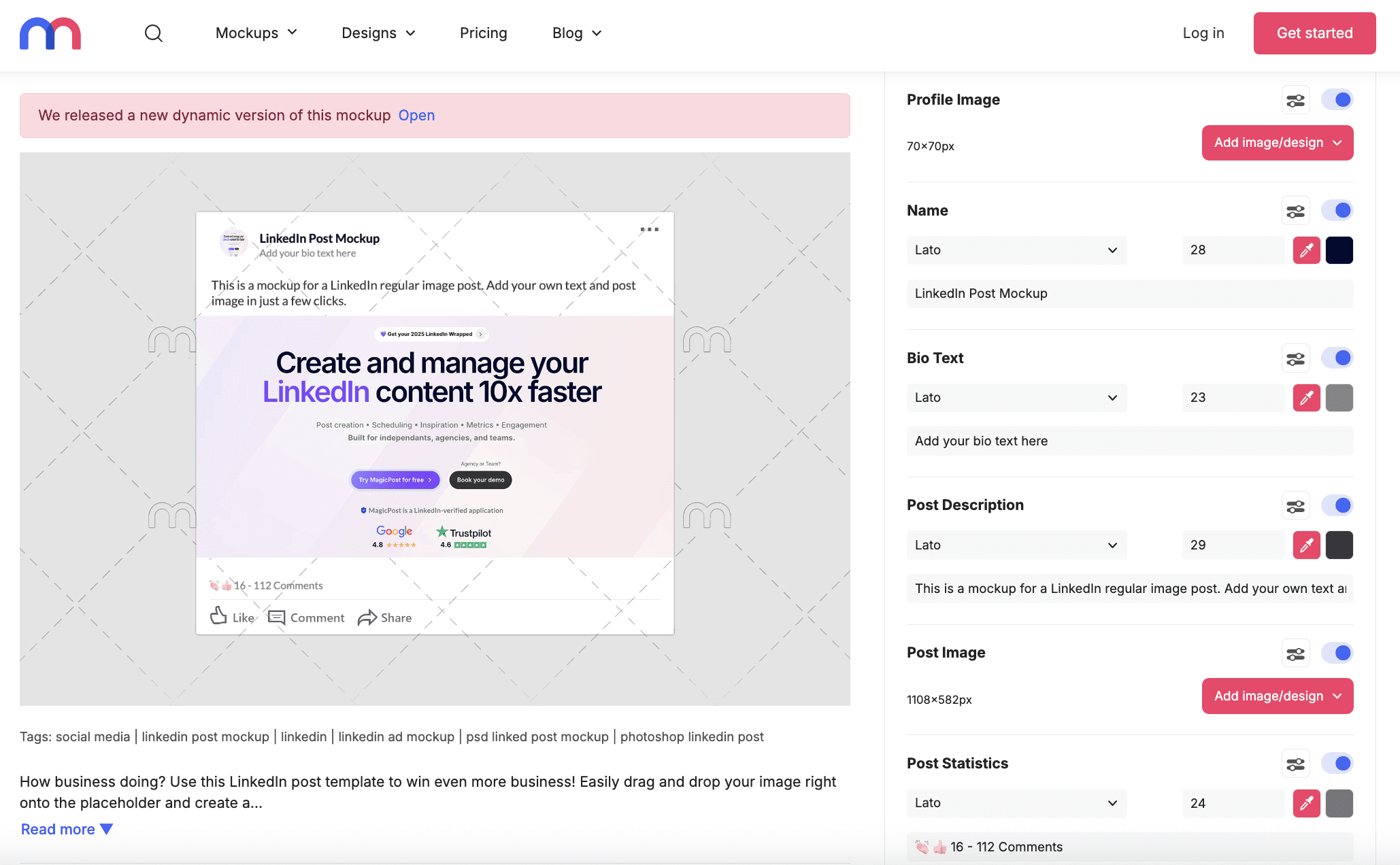
How to use MediaModifier LinkedIn Post Generator
Start by customizing the name and bio text.
Enter the profile name you want to display and adjust the font, size, and color if needed. You can also add a short bio or headline to match how LinkedIn profiles appear in-feed.
Then, move on to the post description. Insert the text of your LinkedIn post exactly as it would appear on the platform.
After that, upload the post image.
Drag and drop your visual into the post image placeholder, typically sized around 1100×582 pixels.
You can also enable and adjust post statistics.
Toggle likes, comments, and engagement numbers to simulate social proof and make the mockup more convincing.
Once everything looks right, choose your export format.
MediaModifier lets you download the mockup as a PNG or JPEG.
You can also edit the template further or download the PSD if you prefer working in Photoshop.
Finally, download the mockup and reuse it across your marketing assets.
It can be used in blog articles, landing pages, presentations, onboarding flows, or AI product demos.
Wrapping Up
AI-powered LinkedIn post mockups have become an essential tool for today’s marketers and content teams.
By combining AI-generated copy with realistic LinkedIn previews, businesses can create, test, and showcase content more effectively, without the risk of publishing too early.
Since LinkedIn is still a leader in professional content marketing, tools that offer accurate, AI-powered LinkedIn post mockups will help brands stand out, work faster, and achieve better results.
8 Best Employee Advocacy Examples to Follow in 2026
Employee advocacy examples to follow in 2026. See how top companies turn employees into growth channels and drive reach, trust, and pipeline.
LinkedIn Content Strategy Agency: What Do They Actually Do?
Looking for a LinkedIn content strategy agency? Before you hire one, understand what a strategy involves, what agencies do, and when to skip them.
LinkedIn Thought Leadership: How to Build Authority in 2026
LinkedIn thought leadership is about posting content that signals expertise. Here’s what builds authority on LinkedIn in 2026 and how to do it consistently.
How to Make Money on LinkedIn: 12 Tactics That Work in 2026
How to make money on LinkedIn in 2026. 12 proven tactics covering services, affiliate marketing, digital products, sponsored content, and more.
LinkedIn Emojis: How to Boost Engagement (+ Copy-Paste List)
Curious about using LinkedIn emojis to boost engagement on LinkedIn? Here are the ones that work, how many to use, and a full copy-paste reference list.
What Is Employee Advocacy? (2026 Quick Guide)
Turn employees into a scalable growth channel. Increase reach, trust, and inbound leads with a structured employee advocacy strategy.
The 6 Best Employee Advocacy Software in 2026 (Full Review)
Looking for the best employee advocacy software in 2026? We compared MagicPost, Sociabble, DSMN8, and others so you can find the right fit for your team.